Tuesday, July 19, 2011

Should You Pay For PPC If You Are Already #1 Organically In Google?


Attorneys with very high organic ranking websites will occasionally ask me if they should also be paying for PPC (Pay Per Click) campaigns for the same search term. In a previous post on why you need to be #1 in Google, I had pointed to recent studies by Jupiter search that showed that 87% of traffic from the search engine results pages go to organic results while 79% of people will ignore PPC advertising all together or only click on them AFTER they have exhausted the organic results first. In short, by asking the question of whether or not you should run PPC with a high organic ranking is basically asking if you want the additional 13% of the search results...or one would think.

Well, an interesting article was just released from Search Engine Land that ran a test on exactly this question and here are some of the key findings from their test:

- When running PPC with high organic results, there was an increase of just shy of 20% in combined clicks
- When removing the cannibalization effect of same page results, the increase in clicks worked out to around 12% (Ironically very close to Jupiter's research numbers f 13%)
- ROI is largely positive for running PPC along with organic results but this is ultimately a function of costs and returns.

How About PPC Landing Page Conversions?

One of the arguments for using PPC is that you can direct the clicks to nearly any webpage you want - unlike organic listings where the search engines (with SEO help from you) determine where the clicks go. These specialized "landing pages" tend to have higher conversions since they are designed specifically just for converting website traffic from PPC ads. Based on this Linkstudy, the conversion ratios of the landing pages were typically around 10% higher than organic search pages.

So What Should You Do?

In summary, if you are considering running PPC along with your high organic placement, try running the same tests as they did in this study and see if the ROI is there for your desired search term/s. If your ROI is positive, stick with it. If not, stay with your organic search results.

To learn more about lawyer marketing online and how to better market your law firm, please contact the SEO Consultant Firm today to see how we can help you...

Monday, July 18, 2011

Most Large Law Firms Have Twitter Accounts - But Few Tweet Often


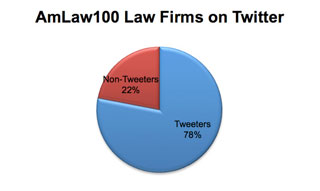
A recent report our by the National Law Journal shows that although most of the nations largest law firms (78%) now have at least 1 twitter account yet most do almost no tweeting at all. Of the firms that had Twitter accounts, eight have protected accounts - meaning you must receive firm permission to access these accounts.

The debate still rages on as to the real effectiveness of Twitter and the business of law. We continue to hear stories of attorneys effectively using social media during high profile cases such as the Angel Alvarez case were he survived 20 gunshot wounds from the police in NYC. Conversely, many of the most highly followed attorneys on Twitter continue to claim that little or not new client generation has resulted from these efforts.

As attorneys continue to learn more about social media and its uses, they continue to question its effectiveness and the best uses of their time and legal marketing dollars.

When working with attorneys, the initial questions I commonly receive are the following:

- What social media accounts do I need (i.e. Facebook, Twitter, LinkedIn, Videos, etc.)?
- Do I need accounts for my firm, attorneys, by practice area, etc.?
- How do I maintain each of these accounts?
- What do I write about on these accounts?
- Is this an effective use of my time?

To best questions, I continue to promote the creation of a legal active content strategy. This strategy is based on the simple creation and integration of all of the mostly commonly used social media tools into one seamless and easy-to-use information network.

Once created, information is entered in one location (your legal blog) and then transmitted throughout your entire social media network automatically. No more entry into multiple accounts and not more worrying about which social media tool will work the best for you.

If you would like to learn more about setting up an effective active content strategy for your law firm, please contact us today so out top search engine optimization consultants we can help you grow your practice online.

Tuesday, June 28, 2011

Google Resets Their Page Ranking in The Google Tool Bar


In case you haven't yet noticed, Google reset their Page Rank on a system-wide basis today. As a result, you may want to take a look at the impacts on the page rank for your website, webpages and blog/s.

On the legal directory front, here are the new page rankings:

PR 8: FindLaw.com
PR 8: SuperLawyers.com
PR 7: Lawyers.com
PR 7: NOLO.com
PR 7: HG.org
PR 6: AVVO.com
PR 6: Washlaw.edu
PR 6: AllLaw.com
PR 5: Accidents.com

Contact Us Today to learn more about how our search engine optimization consultants can help your attorney internet marketing.

Tuesday, June 21, 2011

6 Steps to Creating Optimized Blog Posts

1.) Write About Something Useful

Sounds simple right? The problem is that many attorneys create blogs without a clearly defined goal and strategy. Here are some critical elements to consider: Are you posting consistently? Who is creating the blog posts? What are the topics of the posts? And most importantly: Is the information I am posting useful to my target audience? For example, if you are a criminal defense attorney – do people want to know about your weekend or are they more interested in changes in the DWI laws? If you are a divorce lawyer, do your prospective clients want to know about how many people got a divorce last month or how you can protect their assets in a divorce? These are just a couple of examples to illustrate a key point: people will follow your blog only if you give them a reason to. The best reason is to provide them with USEFUL information.

2.) Create a Keyword Rich Subject Lines.

Many people search online based on words and phrases that come intuitively to them and are related to the topic. The subject line of your blog post creates what is called a title tag for that page which is analogous to the title of a book in importance. Because of this, you need to create a subject for your blog post that contains the keywords related to your article and in a manner that is interesting, brief and compelling. If you have a blogger blog, you need to change the rendering order of your title tags first. Since most people will determine whether or not to read your blog post based on what they see in the subject line, make sure you carefully review it and do not publish until you have determined that it contains commonly used keywords, is interesting to a potential reader and is compelling.

3.) Create Textual Links From Your Content To Your Website Pages

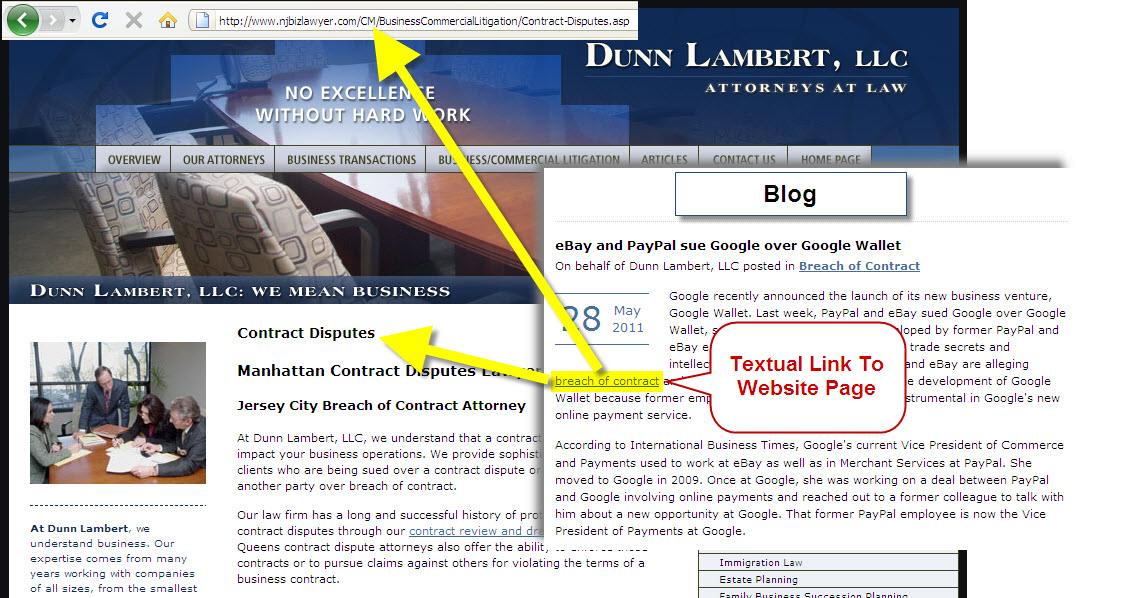
Most attorneys have blogs to help support the authority of their websites. Since your website is your main conversion tool, blogs will commonly lead readers to websites for better conversions. One of the most important ways to lead a user to your website and build up the authority of your website at the same time is to create at least 1-2 textual links from each blog article to various pages within your site. For attorneys, these are commonly your practice area pages.

4.) Create A Clear Call To Action

You should always finish a blog entry with a suggested next step (or call to action). If you took the time to optimize your blog entry to grab readers, make sure you providing them with next steps after they read the article so you can improve your conversions. There is a reason why almost every product commercial on TV ends with “Call Now” – it tells the viewer what to do next. Your blog entry should do the same thing.

5.) Use Your Keywords In Your Content

Keywords and phrases that are important enough to include in the subject line of your blog post should also be repeated in the content of your blog post. The search engines not only index based on the prominence of the keywords (in the subject line) but also based on the density of the keywords repeated throughout your entries. It is a good idea to repeat these words and phrases at least 2-3 times in a typically 500 word entry but don’t overdo it – you don’t want to look to SPAMY to the search engines. It is also a good idea to substitute similar words and phrases as well to grab a bigger potential search such as: Attorney or Lawyer, Car or Automobile, Injury for Accident, etc.

6.) Add Links To Social Media

Just because a user may have found your blog now doesn’t mean they will find it again or remember you. With all of the various websites and blog the typical user visits, you cannot expect that all visitors will all proactively continue to come back again and again. Since over half of Americans now have Facebook accounts, it is important to now create your own social media properties and links to these accounts from each blog post so they can simply click a “Like” button once and will be able to follow your blog in their Facebook News Feed Page in the future. With an active content strategy, you can now have your blog posts automatically feed your content to your Facebook Page, Twitter and LinkedIn page where people can see you on a consistent basis.

Contact Us if you would like to learn more about lawyer marketing online and how we can help your law firm generate more clients and cases for your practice.

Monday, June 20, 2011

Cohabitation Agreements On The Rise


If you are a divorce attorney, you know how difficult it can be in today’s economic environment. Historically, a couple’s largest asset heading into a divorce was their home. With the advent of the great recession, couples are struggling not only with finding and keeping a full-time job but also with the historic declines in their home values. Recent numbers showing roughly 23% (or 1 in 4) mortgaged homes are underwater and combined with our economic climate and low savings rates, it is little wonder why people simply cannot afford to get divorced…not to mention pay the legal fees in doing so.

In a recent survey by the AAML, 39% of attorneys indicated that they are seeing an increase in “Cohabitation Agreements” over the past 5 years. If you are a typical family / divorce lawyer with a website, chances are you already have pages for divorce, child support, child custody, etc. But do you have a web page for cohabitation agreements? Based on a recent search in Google, here are the results I received:

Divorce Lawyer: 8.7 million pages

Child Support Lawyer: 11.1 million pages

Child Custody Lawyer: 6.87 million pages

Separation Agreement Lawyer: 1.24 million pages

Prenuptial Agreement Lawyer: .82 million pages

Cohabitation Agreement Lawyer: .68 million pages

From the numbers listed above, it is clear that some attorney marketing efforts are not keeping up with the market demand. Since a cohabitation agreement is very similar to a prenuptial agreement, it is natural to assume that the numbers should be relatively equal as well.

Please contact us today if you would like to learn more about lawyer marketing online and how we can help your law firm generate new cases and clients.

Monday, June 6, 2011

Legal Market Losing Jobs - Outsourcing On The Rise

According to recent government labor statistics; the US legal market has lost 700 and 1000 jobs in the months of April and May respectively. At a time when the US economy is starting to stabilize, the legal market continues to struggle in job growth. Year-over-year, the legal industry has fell from 1,113, 100 jobs in 2010 to 1,110,400 jobs in 2011 - a loss of 2700 jobs.

If there is a bright spot in the legal industry it is likely coming from the legal outsourcing industry - as indicated in a recent NYT's article. Here are a couple of key points from the article:

- Legal outsourcing revenues are expected to grow from $400 million in 2010 to $2.4 Billion in 2012. Although a fraction of the world's $200 Billion legal market, the growth is still staggering

- Outsourcing jobs on average commonly pay better (in the $50,000 - $80,000 range) than temp work

- Many legal outsourcing companies are keeping their working within the United States. These companies are typically opening offices and hiring lawyers in lower-cost areas in the US, like in West Virginia, Texas and North Dakota.


Visit our website to learn more about legal marketing online and how our SEO consultants can help you grow your practice

Friday, June 3, 2011

Optimizing Title Tags in Blogger Blogs


One of the knocks on using Blogger for a blogging platform has to do with the rendering of the title tags within the blog. Based on a standard confirmation blogger blog; the title of each blog post will display AFTER the default title of the blog.

Why is this an issue?

The most important on-site SEO element of any website or blog is the Title Tag for each page on the blog. Since most blog titles tags will render from the blog post subject line, it is important that the primary keywords and phrases for a blog post be displayed from left to right in importance. Since Blogger by default with always display the blog title BEFORE the subject line of each post in the title tag, the signals and Blog SEO value of each post are diminished.

How you can fix the problem

Fortunately there is a work around to this problem that will change the defaults to displaying your blog post subject line BEFORE your blog title and here is how to make the change in your blog:

1.) Log into your Blogger Blog (at either blogger.com or through your Google accounts admin screen) and navigate to: Design > Edit HTML

2.) Back up your template just in case you make a mistake and need to recover your standard template again - click on the "Download Full Template" button.

3.) Find the following code set (near the top - you can also click CRTL + F and paste the following line code to find it: <data:blog.pageTitle/>
<title><data:blog.pageTitle/></title>
4.) Delete and replace the previous line of code (#3 above) with:

<data:blog.pageName/> |</span><br style="color: rgb(153, 0, 0);"><span style="color: rgb(153, 0, 0);"><data:blog.title/> <data:blog.pageTitle/>
 
<data:blog.title/>

<data:blog.pageName/>


5.) Click on the "SAVE TEMPLATE" button on the lower-right of the box and then VIEW BLOG so you can see the results. Here is how this this looks on my blog for one of my blog posts:


Contact the SEO Consultant firm to learn more about Blog SEO and how we can provide Lawyer SEO consulting services for your law firm.